I used Moxie. I taught Moxie. I helped other web designers set up their businesses inside Moxie.
And then I switched — to the Fluent Ecosystem, which is now the system I run my business on entirely.
I’m Lisa Williams, founder of Designer Studio HQ. This post is my honest take on why I made the move, what it actually costs, and what changed on the other side. If you’re a web designer who’s been feeling the friction with Moxie (or any CRM), this one’s for you.
What Moxie Is Built For
Moxie was designed for service-based businesses and freelancers, and it genuinely handles the client-facing layer well:
- Inquiry forms and intake
- Proposals, contracts, and invoices
- Client portals and project communication
- Scheduling and calendars
- Pipeline automation tied to project stages
For getting from “new inquiry” to “invoice paid” without juggling five apps, Moxie does the job. No argument there.
But here’s where it gets complicated: Moxie manages your client delivery. It doesn’t run your whole business.
Where It Gets Frustrating
Here’s where I have to be honest — and I know I’m not alone in this, because I’ve heard it from multiple designers in my community.
Moxie has some real friction points that go beyond what it simply doesn’t offer:
- Project management is surface-level. It tracks project stages and tasks at a basic level, but if you need real depth — detailed task management, complex project oversight, clear visibility across multiple client projects — it falls short.
- Team and collaborator access is glitchy. If you work with contractors, VAs, or project collaborators, the experience of adding and managing them in Moxie has been consistently problematic.
- The client portal isn’t great. It works, but it’s clunky and not particularly user-friendly from the client’s perspective — which matters when you’re trying to deliver a professional experience.
- Development has stalled. There haven’t been meaningful updates to the platform in over a year. For a tool you’re building your business on, that’s worth paying attention to.
The Fix: Web Designer’s Project HQ
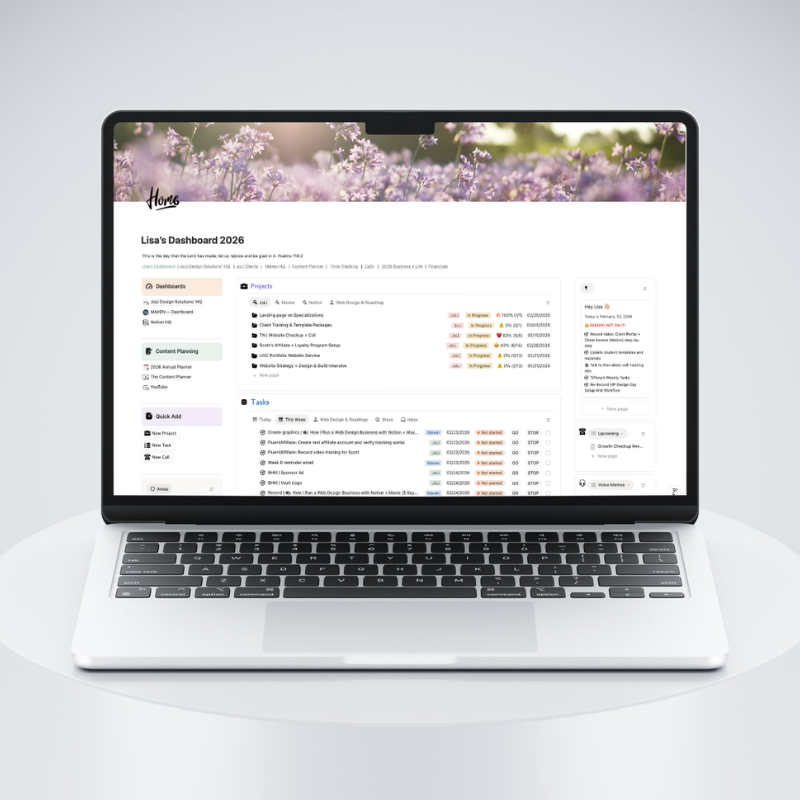
For the project management, client portal, and team collaboration pieces, I moved to Notion — and the Web Designer’s Project HQ solved all three. It gives you the detailed task management and project visibility that Moxie lacks, and a client-facing portal that’s actually beautiful and easy to use, and a clean way to bring in team members and collaborators without the glitches. Clients can see their project status, access deliverables, and find everything they need — without friction. Your team can work alongside you without the chaos. It’s one of those setups where everything just works, and it’s easier to build than you’d expect.
And Then There’s the Bigger Gap
Even setting the frustrations aside, there’s a structural limitation that Moxie (and tools like it) simply can’t solve: it isn’t an email marketing platform.
As a web designer, your business isn’t just projects. It’s content, lead nurturing, your email list, your marketing, and — if you’re anything like the designers I work with at DSHQ — it’s also building the kind of authority that brings in better clients.
Moxie’s middle-tier plan — the one that unlocks full automation — runs $25/month. Reasonable. But Moxie isn’t an email marketing platform. The moment you add Kit, MailerLite, or ActiveCampaign on top of it, you’re at $54–$104/month — and your email platform still has no idea what’s happening in your CRM. Your CRM has no idea what’s happening with your subscribers. You’re manually bridging the gap, or hoping Zapier holds it together.
That’s the gap the Fluent Ecosystem fills.
What the Fluent Ecosystem Is
The Fluent Ecosystem is a suite of WordPress plugins built by the same team — WPManageNinja — to work natively together inside a single WordPress install:
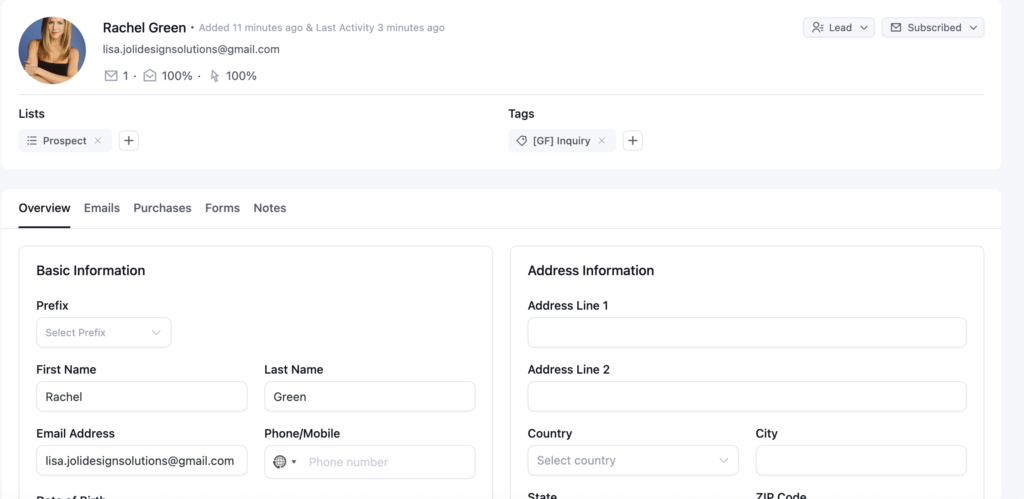
- FluentCRM — Full CRM, email marketing, pipelines, automation sequences, and contact management inside WordPress
- FluentCart — Sell services, digital products, and subscriptions.
- FluentBooking — Scheduling and booking embedded directly on your site
- FluentForms Pro — Smart intake forms connected to everything
- FluentAffiliate — Built-in affiliate management (available when you’re ready to scale)
- FluentCommunity — A private membership community on your own domain
- Fluent Support — Help desk and client communication
You don’t have to use every piece on day one. I run my web design business on FluentCRM, FluentForms, FluentBooking, and FluentCart. The rest of the suite is there when — and if — you need it.
One thing worth knowing: FluentCart is a product and checkout platform — it handles your fixed-price offers, deposits, and recurring subscriptions beautifully. But it isn’t a true invoicing tool. If you need to send a custom invoice for hourly work or a one-off project (think: “I need to bill a client for two extra hours”), you’ll want a dedicated invoicing platform alongside it. I’ve been looking at Invoice Ninja for exactly this — it’s free to start, connects directly to Stripe, and has the clean “create client → add line items → send” workflow that web designers actually need.
Another important note before you dive in 😂: FluentCRM handles your email marketing logic — the sequences, the tags, the automations — but to actually send emails, you’ll need an SMTP plugin and an email sending platform. The obvious choice here is FluentSMTP (yes, also from WPManageNinja 😄), which connects your WordPress site to a sending service.
And — not surprisingly — WPManageNinja now has their own email sending platform to pair with it: toSend. It’s worth a look, especially if you want to keep everything in the same ecosystem. Super affordable at $3 per 10,000 emails.
The Real Cost Comparison
Here’s the part people always ask about. Right now, most web designers are running two separate tools:
- A CRM (Moxie, Dubsado, HoneyBook): $25–$129/month
- An email marketing platform (Kit, MailerLite, ActiveCampaign): $29–$79/month
Two monthly subscriptions. Two separate systems. Neither one knows what the other is doing.
With the Fluent core stack, you replace both — and pay annually instead of monthly:
- FluentCRM Pro: ~$129/year
- FluentCart: ~$199/year
- FluentForms Pro: ~$79/year
- FluentBooking Pro: ~$79/year
Total: approximately $480/year. WPManageNinja regularly runs deals that bring this down further.
The cost case is straightforward. But the real win isn’t the money — it’s that everything actually works together.
2 Big Wins I Actually Gained by Switching
1. My email list and my CRM are the same thing.
Before, I had contacts in Moxie handling all the projects and invoicing — and then I had to manually add those same people into FluentCRM so they’d be in my email marketing. Two separate systems, no connection between them, and me in the middle doing data entry.
2. My inquiry-to-client workflow runs automatically.
A lead fills out my discovery form via FluentForms → they’re added to FluentCRM with a tag → a automation fires sending a confirmation email. When they book a call through FluentBooking, their contact record updates automatically. When they sign on as a client, I update their pipeline stage and the right follow-up sequence kicks off. All of it. No manual steps, no copy-pasting between tools, no “did I remember to send that?” anxiety.
Is This the Right System for Every Web Designer?
Honestly — it depends on where your business is.
If you’re early-stage and purely focused on service delivery, you may not need the full Fluent suite yet. Start with FluentCRM and FluentForms and see how the foundation feels.
But if you’re at the point where your marketing and your client operations feel like two different worlds that never talk — and you’re paying for tools that each solve one piece of the puzzle — that’s exactly the problem this stack solves.
Where to Start If You’re Curious
If you want to explore the Fluent Ecosystem without overhauling your entire business overnight, start simple:
- Install the free version of FluentCRM on a WordPress site
- Add free FluentForms and build an intake form that tags contacts on submission
- Watch how the data flows — that’s where it starts to click
Note: automations require FluentCRM Pro, but even the free version lets you see how contacts, tags, and forms work together. That foundation is enough to know whether this is the right direction for your business.
And I want to be real with you for a second: I know switching platforms feels like a lot. You just got comfortable somewhere, and the thought of moving everything again — the contacts, the forms, the automations — is exhausting before you even start. I get it. I’ve been there.
But I also know what’s on the other side of it. And that feeling when your system is finally running the way it should — when the form submits and the tag fires and the email goes out and you didn’t do a single thing — is genuinely exhilarating. It makes the transition worth every hour.
If you want to think through your specific setup — what to keep, what to replace, and how to make the transition — book a Helpline session and we’ll map it out together.