
If your business currently lives across 17 browser tabs, a Notes app graveyard, random voice memos, and a Google Drive folder called “New Branding” from 2023, you are not “bad at systems.” You are just trying to run a whole business with your brain as the filing cabinet.
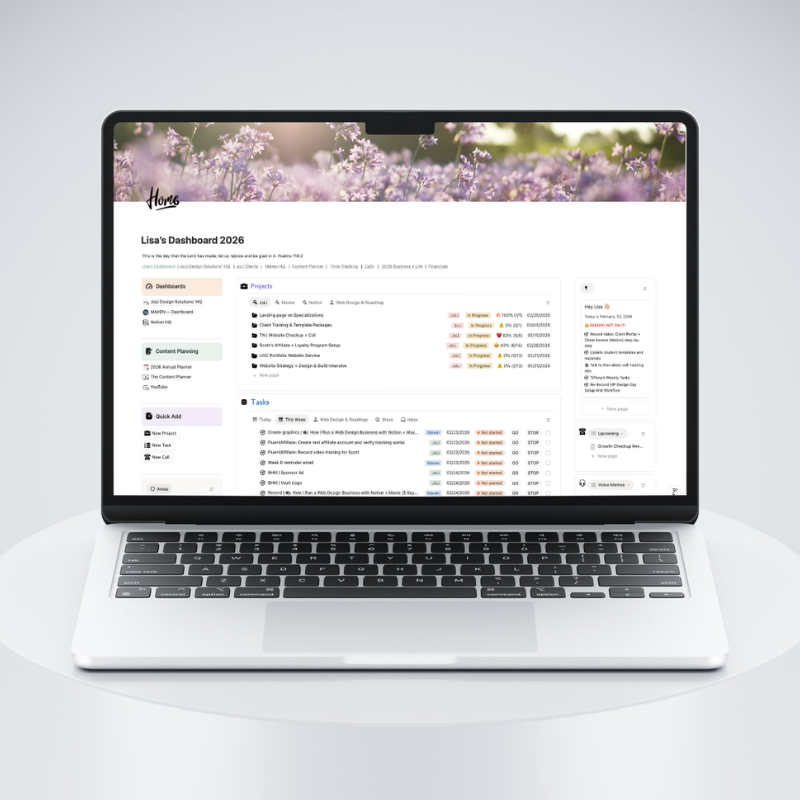
And listen, client delivery usually has some structure. But everything around it, like content, marketing, operations, and decision-making, tends to happen in the cracks of your week. That is where a Notion HQ comes in… a relaxing, welcoming home base where your work is organized in a way you can repeat.
1) Multi-project visibility (so you stop guessing what matters most)
Picture this: it is Monday. You open your laptop, and before your coffee even has a chance, you are hit with five competing priorities. A client is waiting on revisions. Another client just sent 14 new assets with file names like final2_reallyfinal. You promised yourself you would write a blog post. And somewhere in the back of your mind, you are pretty sure an invoice is overdue.
When you do not have a home base, you end up working on whatever yells the loudest. A Notion HQ changes the question from “What should I do?” to something way more useful: What is active? What is next? What is blocked? What is waiting on someone else?
That clarity is the difference between a productive day and a day where you work nonstop and still feel behind.
2) A content engine that does not rely on your memory
Content does not fail because you do not have ideas. It fails because your ideas are scattered.
You think of a post while driving, save an IG audio, write a hook in Notes, start an outline in a doc, and then client work gets busy and the whole thing disappears into the void. In a Notion HQ, content becomes a simple, repeatable flow where you capture the idea, draft it in one place, edit it once, schedule it, and publish it.
The win is not just consistency. The win is that you stop starting from scratch every time.
I started using an app called NotionSocial. https://notionsocial.app/.
NotionSocial is basically the missing link between your Notion content planner and actually getting posts out the door. Instead of planning content in Notion and then copying everything into a separate scheduler, you write and manage your posts in your Notion database, and NotionSocial handles the scheduling and publishing from there.
Here’s what this looks like in my setup for Instagram, using the properties I already have in my Content Database:
- Time: I set the date and time I want the post to go out.
- Platforms: I choose Instagram (and any other platforms I am publishing to).
- Status:
- I set it to ✅ Done when the post is ready to be sent to NotionSocial.
- NotionSocial updates it to 🕐 Scheduled once it is scheduled.
- NotionSocial updates it to ✅ Published once it is live.
Why this is so nice: I am not re-entering the same caption in multiple places. My planning database becomes my scheduling dashboard, and the status tells me exactly where each post stands.
3) A notes hub for “where did I land on that?” moments
This is the sneaky reason your brain feels full: you keep re-thinking things you already worked through.
You write copy, then a week later you cannot find it. You make a decision about an offer, then a month later you are second-guessing it because you forgot why you chose it. You outline a process, then you rebuild it from scratch because the notes are buried in 12 places.
A Notion HQ fixes that by giving you a Notes hub. Not a fancy system. Just one reliable place where your “brain dump that actually matters” lives, so you can pull it back up when you need it.
Here are a few real examples from my own Notes Database:
- Offer + workflow thinking (so I can connect the dots between tools and my actual process). Example: “Blending Notion with Web Design”.
- Promo + pricing notes (so I can repeat what worked, without re-inventing it). Example: “Banner + Price Copy”.
- Automation + email notes (so the tech matches the messaging). Example: “Automation Flow + Sales Copy”.
And sometimes the notes are super tactical, like keeping a reusable snippet handy. Example: “Fluent Cart Emails | HTML”.
The point is not “more documentation.” The point is that when you need an answer, you know exactly where to look.
4) An operations + templates library you actually use
Most designers have templates. They just cannot find them when they need them.
So you rewrite the same onboarding email, rebuild the same checklist, and recreate a process you have already done 12 times. A Notion HQ becomes the place you go to run the business, not because it is fancy, but because it is findable.
This is where you keep onboarding steps, repeatable checklists, your standard project timeline, your go-to email snippets, plus the links and tools you reach for constantly. The goal is not to document your entire life. The goal is to keep a small set of assets you reuse all the time, so your future self is not always reinventing the wheel.
Here are a couple real-life examples (because “templates library” can sound more complicated than it needs to be):
- My web design Project HQ template: the repeatable project page you spin up every time, with the same sections and checklists so you are not reinventing the plan.
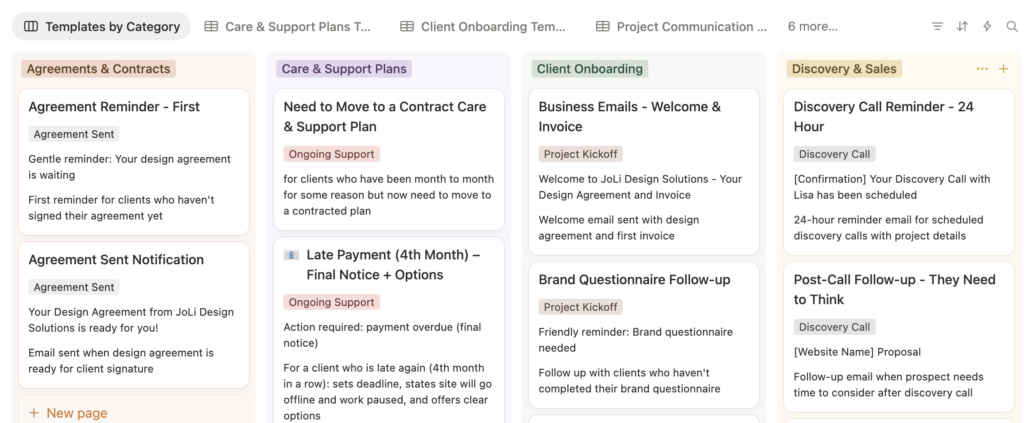
- My JoLi Design Solutions email templates: your go-to replies for inquiries, onboarding, timeline updates, and “here’s what I need from you next,” so you are not rewriting the same email in a new tone every single time.
5) A “light” client view (just enough to stay oriented)
You do not need to shove a full CRM into Notion.
You could if you wanted to though! 😆
But having a lightweight snapshot is helpful, especially when you are juggling multiple clients and projects at the same time. When you can see at a glance who is active, what stage each project is in, where the project notes live, and what you are waiting on, you stop doing that thing where you open six tabs just to remember what is going on.
Could your workflow BEEEEE any messier? (I say that with love. ❤️)
Your Notion HQ is where you run the business
It’s where you plan work, make decisions, and store what matters.
If you use other tools for client communication, invoicing, or scheduling, great. Keep them. Notion is the home base that keeps everything connected, so you feel calm and clear even when you are juggling a lot.
Want to Build Your own Notion HQ with my guidance?
Build Your Notion HQ – The Business Systems Blueprint
Or schedule a Systems Direction Call if you want help choosing the right setup and next steps