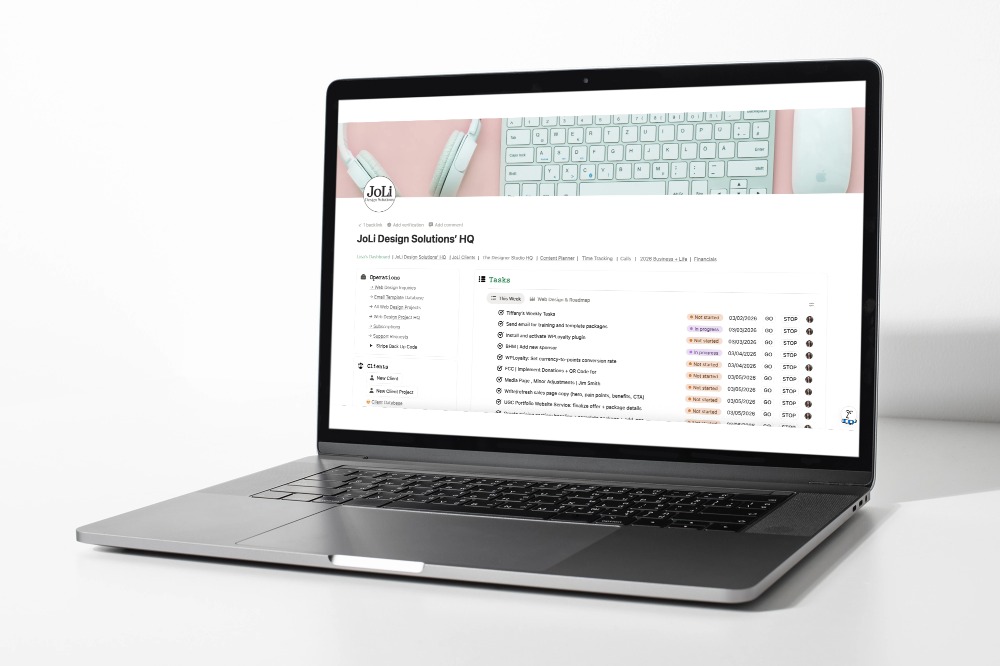
Build Your Notion HQ: The Business Systems Blueprint

The complete system for web designers & service providers ready to ditch the chaos and run their business like the pro they are.

ditch the chaos for $179 →
One lost client, one missed deadline, or one hour a day wasted hunting for files — that's already costing you more than the investment in this course.
notion headquarters homepage

The real pain isn’t “too much work.”
It’s no home base.

seamless journey of moxie setup

Most overwhelmed business owners don’t need a new planner.
They need a Headquarters.

A home base where the full picture lives:

  • what you’re working on
  • what’s due next
  • what you promised
  • what decisions were made
  • where the assets actually are

Because when you don’t have a home base, your brain becomes the system.

And that’s… not ideal.

Your CRM handles client operations. But who's running your business strategy?

joli design solutions notion dashboard

Your CRM runs your client operations beautifully. But who’s running the strategy behind your business?

Notion does!

Your Notion HQ runs everything else — multiple brands, multiple revenue streams, client work, courses, content, and strategy — all connected in one place that keeps you sane.

No more scattered notes across random documents. No more wondering “What should I be working on to grow my business?” No more losing track of great ideas and resources.

Included in the Business Systems Blueprint

Lifetime access

Module 1:
Build a Notion HQ Dashboard

Database Setup
→ Projects
→ Tasks
→ Notes
→ Resources
→ Areas

I walk you through how to layout your dashboard and create a welcoming workspace.

Module 2:
Your Personal AI Assistant

AI Agent Setup
→ Add Voice + Business Context
→ The Systems + Sales Sidekicks

Prompt Starter Templates
→ Emails
→ Content
→ Project planning

Module 3:
Optimize, Customize, Fine-Tune, and Expand

HQ Extra
→ Client Databases + Relational Properties
→ Voice Memos + Transcription Workflow
→ Setting Up a Support Request Database with a Form

Module 4:
Database Automations for Beginners

In this bonus module, you’ll learn how Notion’s built-in database automations work and when to use them

→ Easily track time with my Go/Stop buttons!
→ Synced blocks and notification automations

Bonus Materials

  • Notion Keyboard Shortcuts Cheatsheet
  • Database Property Quick Reference 
  • 10 AI Prompt Templates for Web Designers
  • 10 AI Prompt Templates for Service Providers
  • Before You Automate: Manual Workflow Checklist
  • Notion Page Templates Library
  • Integration Options Guide

Most web designers are paying $300–$500 a year for apps that don't talk to each other. 🫣
This fixes that for less than one of those subscriptions.

Let's save you some $$

Still on the fence? Here's the honest version.

Without a System With Notion Business HQ
Monday starts with “wait, where did I put that?” Monday starts with a clear weekly view — already built
You rebuild your project checklist from scratch every time Duplicate a template and you’re running in 5 minutes
Your “notes app” has 200 untitled notes you’ll never read Every idea, meeting note, and decision is searchable and linked
Content ideas die in your camera roll Your content pipeline is planned, tracked, and ready to execute
You have a CRM for clients — but nowhere for you to think Your CRM runs operations. Notion runs your brain.
You’re busy but can’t explain what you actually got done You end the week knowing exactly what moved forward

Is The Business System Blueprint for Web Designers Right For You?

This course IS right for you if:

  • ✓  You’re a web designer or service provider running a real business (not a hobby)
  • ✓  You’ve tried Notion before but never got it to stick
  • ✓  You want your system built once, not patched together forever
  • ✓  You’re ready to stop managing your business from your inbox

This is NOT right for you if:

  • ✕  You only need a CRM (that’s what Moxie is for — [check it out here])
  • ✕  You’re looking for a quick template drop-in with no context (try the Project HQ template instead👇🏼)
  • ✕  You’re not willing to spend a few hours setting this up properly

Yes! This course is right for me!

Take my money! 🥳

Frequently Asked Questions

  • Do I need to know Notion already?

    It’s best if you have at least have a basic knowledge of how Notion works.  I walk you through everything step-by-step for the course, but if you have never used Notion, you’re going to want to have some experience before you jump in.

  • I'm not a web designer-will this work for my business?

    Absolutely! While my examples and screenshots are from web design, the system works for any service-based freelancer or solopreneur. Graphic designers, coaches, copywriters, VA’s, photographers – anyone managing clients, projects, and scattered information will benefit. The core databases (Projects, Tasks, Notes, Resources, Areas) are universal. You’ll just adapt the properties and views to fit your specific services. The principles are exactly the same.

  • Will this work with my existing CRM/tools?

    Absolutely! The course teaches you how to build your Notion HQ and integrate it with whatever tools you already use. The principles work with any business system.

  • Is there a refund policy?

    No. Because all of my offers are digital (courses, workbooks, audits, workshops, and more), and you get immediate access to the content, all sales are final and non-refundable. 

  • Steve and Lisa Williams

    Why Learn From Lisa?

    I’ve been where you are. Before I built my business headquarters in Notion, I was juggling spreadsheets, sticky notes, Google Docs, and way too many browser tabs. I’v been using Notion for years, but it took dialing in my complete Notion system-databases and AI agent to finally get organized.

    I’m a teacher at heart. I spent years in the classroom before building my business with my husband Steve. I know how to break down “this feels impossible” into “oh, I can actually do this.”

    I live and breathe systems. I’ve spent the last year building and refining this exact setup — not just using it myself, but helping web designers build systems that actually stick. I run two brands (JoLi Design Solutions and The Designer Studio HQ), manage multiple courses and programs, and handle complex client work-all from one central Notion workspace.

    Notion is where your whole business gets to breathe. It’s the place for strategy, planning, content, knowledge, SOPs, dashboards, and decision-making — so everything you run stays connected and easy to find. I help others build systems that actually stick.

    Stop Wingin’ It. Build a Business Headquarters.

    For the people who are done “figuring it out as they go.”

    • You stop losing things. Notes, links, files, and decisions finally live in one home base not scattered across 12 tabs.
    • You plan it once, then reuse it. Projects and content get repeatable templates, so you can hit “duplicate” instead of starting from scratch.
    • You know what matters this week. Priorities stay front and center, not buried under the busywork.
    • You connect the dots (without the chaos). Ideas → plan → tasks → done all linked, all trackable, all in one place.

    a black and white portrait of a woman working on laptop
    cozy workspace schedule match call background

    Ready to Build Your Notion HQ Business Systems?

    If you want a step-by-step process to build a Notion HQ designed specifically for web designers and service providers, my course walks you through it.

    Lisa Williams

    Lisa Williams

    Replies within 24-48 hours

    I will be back soon

    What can I help you with?

    [CHAT WIDGET] Help
    Lisa Williams
    Hi there 👋
    Send me an email and let me know how I can help you.
    Help Need Help?